
4Drivers Daikin DTA116A51 VRV VRF UI Gateway
Overview
The 4Drivers Daikin DTA116A51 VRV VRF UI integrates Daikin VRV/VRF systems with Control4 through the Daikin DTA116A51 adapter (RS-485). One adapter controls up to 64 indoor units (4 DIII-Net groups of 16).
- A single connection for all thermostats: each 4Drivers Daikin Thermostat binds to the gateway on its own and tells which unit it controls through its Unit ID
- Web UI on the driver button (Navigator/Composer): control and readings of every unit, with "Find units" and "All Off"
- Cool, Heat, Fan, Auto and Dry modes; Low/Medium/High fan; P0-P4 and Swing louver
- Daikin error code (e.g. U4, A3), Forced Off and Cool/Heat master per unit
- Celsius or Fahrenheit
- Adjustable on/off methods for sites where the original Daikin controller is also used
- Built-in 4Drivers licensing/trial
Requirements
- DTA116A51 adapter (or newer, same protocol) installed on the DIII-Net bus
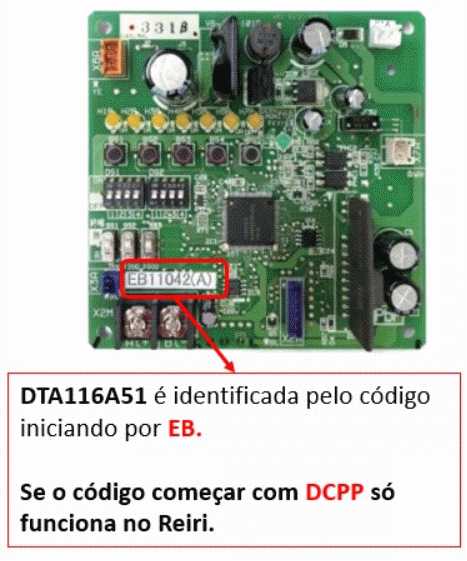
- Board ID starting with EB (e.g. EB11042(A)). DCPP boards are not compatible
- Controller serial port with a powered RS-232/RS-485 converter, or an IP/RS-485 converter with the 4Drivers RS-232 RS-485 - IP Gateway driver
- Control4 OS 3.3.0 or later (required by the Web UI)
Step-by-Step Setup
1 — DTA116A51 board
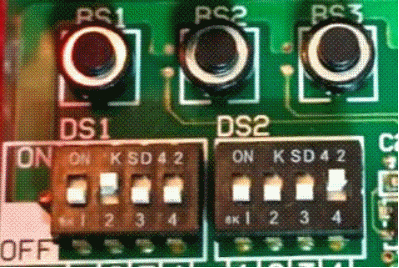
- Set DS1 to
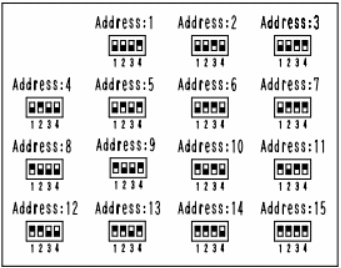
19200 8 even 1(19200 bps, 8 data bits, even parity, 1 stop bit) - Set DS2 to the board Modbus address (1 to 15). Enter the same number in MODBUS Address
- When using an IP/RS-485 converter, set it to
19200 8 even 1 none
2 — Add the gateway
- In Composer Pro, add the 4Drivers Daikin DTA116A51 VRV VRF UI and connect Serial RS-232 to the controller serial port (or to the IP converter driver)
- Check MODBUS Address = DS2 address
- Enter the License Key (or keep "Trial") and check Validation
3 — Find the units
- Under Actions, run Scan Units (or "Find units" in the Web UI)
- Message lists the Unit IDs that answered
4 — Add the thermostats
Add one 4Drivers Daikin Thermostat per indoor unit and fill in its Unit ID, calculated from the address shown on the Daikin controller:
| DIII-Net group | Addresses on the Daikin controller | Unit ID |
|---|---|---|
| 1 | 1-00 ... 1-15 | 0 ... 15 |
| 2 | 2-00 ... 2-15 | 16 ... 31 |
| 3 | 3-00 ... 3-15 | 32 ... 47 |
| 4 | 4-00 ... 4-15 | 48 ... 63 |
Example: unit 2-05 = Unit ID 21 (16 + 5).
OK while the board answers.Properties
| Property | Default | Description |
|---|---|---|
| MODBUS Address | 1 | Board address set on DS2 |
| Polling Interval | 60 | Seconds between reads of each unit with a thermostat (30-360) |
| Commands Delay | 100 | Milliseconds between commands sent to the board (30-1000). Daikin recommends spacing writes - raise it if commands get lost |
| UI Temperature Scale | Celsius | Scale used in the Web UI |
| Off Method / On Method | V5 / V6 | How the driver turns units on and off - see below |
| Master ID 1/2/3 and Slaves | -1 / empty | Sites with more than one outdoor unit - see below |
| Icon Type | Icon 3 | Icon shown in Navigator |
| Communication Status | - | OK while the board answers; warns when it stops answering |
| Message | - | Status messages and Scan Units result |
| License Key / Validation | Trial | 4Drivers license key and status |
| Cloud Status / Automatic Updates | - | DriverCentral version: DriverCentral license status and automatic driver updates |
| Debug Mode | Off | Support use |
Actions
| Action | Description |
|---|---|
| Scan Units | Checks all 64 addresses and lists the ones with a unit |
| Refresh All Units | Reads every unit with a thermostat right away |
On and Off Methods
The DTA116A51 only forwards a command to the VRV when the value it receives differs from the last one it stored. When the customer uses the original Daikin controller, that stored value does not change - and the next on/off from Control4 may be ignored. Off Method and On Method choose how the driver works around it.
Off Method
| Option | What it does | When to use |
|---|---|---|
| V5 (default) | Reads the unit's real state first and switches off on top of it. Follows the Daikin manual procedure. | First choice |
| V6 | Reinforced off and, a few seconds later, checks that the unit is really off; resends once if not. | Stubborn "sometimes won't turn off" cases |
| 2X | Sends the off command twice. | Occasional lost command on the serial line |
| V1 | Resends setpoint/mode/fan before switching off. | Alternative to V5 |
| V2 | Same as the plain off command. | Avoid |
| V3 | Off, resend setpoint, off again. | If V1 and 2X do not help |
| V4 | Fan/louver written separately with pauses before the off. | Commands arriving too fast (automations) |
On Method
| Option | What it does | When to use |
|---|---|---|
| Normal | Mode only, no reinforcement. | Sites where the original controller is never used |
| Turn Off and On | Switches off before switching on (effective in Cool). | Intermediate |
| V4 | Turns on after reading the real state and forces an off/on 3 s later. | If V6/V7/V8 do not help |
| V5 | Reads the real state before turning on (Daikin manual). | Alternative to the default |
| V6 (default) | OFF, ON, MODE sequence - reinforcement in Cool only. | Factory default |
| V7 | Same sequence as V6 for every mode (Cool/Heat/Fan/Auto/Dry). | "Won't turn on" in Heat or Fan |
| V8 | V7 + checks that the unit turned on and resends once. | Stubborn "sometimes won't turn on" cases |
VRV Groups (Master ID)
Only for sites with more than one outdoor unit. In each group the master unit decides Cool/Heat for the whole group; a slave asking for Cool while its master is in Heat may have no effect.
- Master ID 1: Unit ID of the master unit of group 1 (
-1= off) - Master ID 1 Slaves: Unit IDs of the group, comma separated (e.g.
2,3,6) - Same for groups 2 and 3
When a slave turns on or changes mode, the driver first sets only the mode of its group master - without turning the master unit on.
Web UI
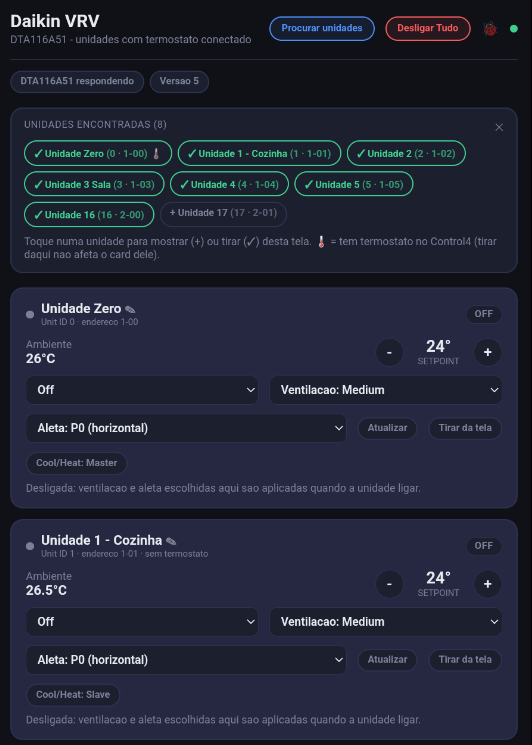
- One card per unit on the page: mode (including Auto and Dry), fan, louver, setpoint and room temperature
- Malfunction/warning alerts with the Daikin code, Forced Off, filter, sensor error and Cool/Heat master
- Find units: tap a unit found to show it on or remove it from the page (with or without a thermostat)
- Rename: tap the card name. When the unit's thermostat is renamed in the project, the page follows
- All Off (units on the page)
- List, names and last scan result are saved
- Debug panel (🐞 icon) to diagnose communication between the page and the driver
Troubleshooting
| Problem | Solution |
|---|---|
| Communication Status shows no answer from the adapter | Check cable and RS-485 converter, DS1 (19200 8 even 1) and that MODBUS Address matches DS2 |
| Scan Units finds nothing | Same checks as above. Also confirm the units show up on the Daikin central controller |
| Thermostat Online = No | No unit at that Unit ID - run Scan Units and fix the Unit ID |
| "Sometimes won't turn on/off" | Try On Method = V8 and Off Method = V6 |
| Won't turn on with any method | On the thermostat: Forced Off = Yes means an external lock (interlock, float switch, emergency stop) - only the HVAC contractor can clear it. If the unit is a Slave, check its group master (Master ID) |
| Error with a code (e.g. U4) | Daikin code, same as on the remote controller - see Daikin service documentation |
| Validation "Trial Mode Expired" | Enter a valid License Key from 4Drivers |
Coming from the previous driver (64 outputs)
This driver replaces the 64 "Daikin UNIT-n" outputs with a single connection. The old UNIT-n output number is the Unit ID of the new thermostat. MODBUS Address, Commands Delay, Off/On Method and Master ID work the same.
Change Log
| Version | Changes |
|---|---|
| 1100 | Initial version |